

Plan your outfits for the week, from clothes you own
Wdrobe puts a week of outfits on your calendar, built from your wardrobe and checked against the forecast, so the morning decision is already made.
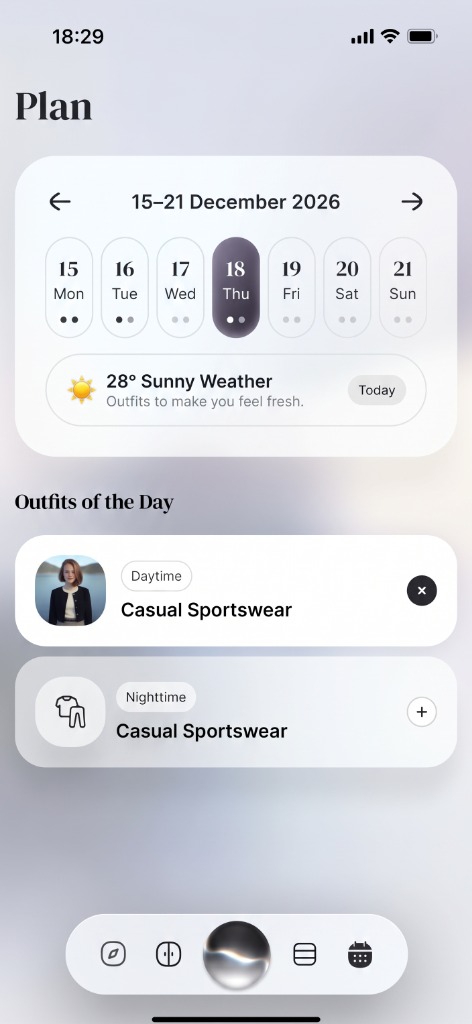
How it works
Add your clothes.
Your wardrobe goes into the app once, from photos.
Fill the week.
Put a saved outfit on a day, or ask the stylist to suggest one for each plan.
Get dressed.
Each morning the outfit is waiting, already matched to the weather.
What makes it different
A plan built from your own wardrobe.
Every planned outfit uses pieces you actually own, so nothing on the calendar needs a shopping trip.
Weather-aware.
The planner looks at the forecast, so Thursday's outfit is not a light dress on a day that turns cold.
See the week on you.
Try planned outfits on your own photo and swap what does not work.
Fewer repeats, more of your wardrobe.
Seeing the week laid out shows when you wear the same five things and which pieces never get a turn.
A planned week
Seven outfits, decided on Sunday evening, all from one wardrobe.
Mon
WorkNavy Blazer
Tue
ClientLinen Shirt
Wed
CasualOxford Denim
Thu
MeetingMerino Knit
Fri
DinnerSilk Blouse
Sat
BrunchBreton Stripe
Sun
ResetCashmere Set
Seven outfits, decided on Sunday evening, all from one wardrobe.
Frequently Asked Questions
Related Articles & Features
How to Plan Outfits for the Week
How to plan outfits for the week by preparing only the days that need it, so the habit lasts longer than a single Sunday.
7 Best Outfit Planner Apps for Your Week
Seven outfit planner apps compared, and why planning three days works when planning seven gets abandoned by Wednesday.
Outfit Repeating Is Fine: Why the Rule Makes No Sense
Repeating a clean, appropriate outfit is normal, useful, and often the clearest evidence of your real personal style.
Discover your style, wherever inspiration finds you
Download Wdrobe to digitize your wardrobe, discover AI-powered outfit ideas for every mood and forecast, and make your next look your best one yet.

