

Put your whole closet in a digital wardrobe
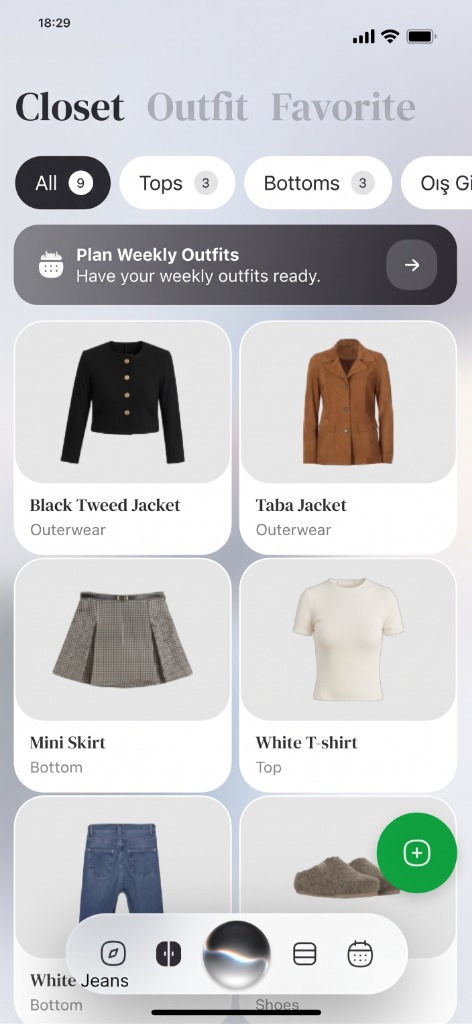
Take photos of your clothes and Wdrobe cuts each piece out, names it and files it by category, colour and season. Everything you own ends up in one place on your phone, ready to build outfits from.


How it works
Photograph your clothes.
Lay each piece flat or hang it up and take a picture. You can add several photos in one go.
Check what the app read.
Each piece comes back on a clean background with its name, category, colour, brand and season filled in. Fix anything it got wrong.
Open your closet anywhere.
Browse by category, see how often you have worn each piece, and pick clothes for an outfit or a try-on.
What makes it different
No typing in every piece.
The app reads the details from the photo, so most of the work of adding a rail of clothes is taking the pictures.
See what you actually wear.
Every piece shows how many times you have worn it, so the shirt that never leaves the hanger is easy to spot.
Your wardrobe feeds the rest of the app.
The AI stylist suggests outfits only from pieces in it, the planner fills your week from it, and try-on puts its pieces on your photo.
Private unless you share it.
Nobody else can see your wardrobe until you choose to make it public on your profile.
On your phone and your computer.
Add clothes with the iPhone or Android app, then open the same wardrobe in a browser at wdrobe.app/app.
A wardrobe in the app
An example of how your clothes are sorted once they are in.
- Tops34
- Bottoms18
- Dresses6
- Outerwear9
- Shoes12
- Accessories11
Camel wool coat
Worn 9 times
Every detail the app fills in can be edited.
Frequently Asked Questions
Related Articles & Features
Digital Wardrobe Guide: Organize Your Closet and Plan Outfits
A step-by-step guide to photographing, tagging, and organizing your clothes into a digital wardrobe you will keep using.
How to Photograph Your Wardrobe Clearly
How to photograph your wardrobe so images are consistent, useful for planning, and clean enough for automatic background removal.
The Best Wardrobe Apps in 2026: 9 Closet Apps Side by Side
Nine wardrobe and closet apps side by side. Wdrobe is our pick for most people, with picks for Android, capsules, planning and a human stylist.
Discover your style, wherever inspiration finds you
Download Wdrobe to digitize your wardrobe, discover AI-powered outfit ideas for every mood and forecast, and make your next look your best one yet.