Best Virtual Try-On Apps in 2026, Compared
10 min read
Wdrobe
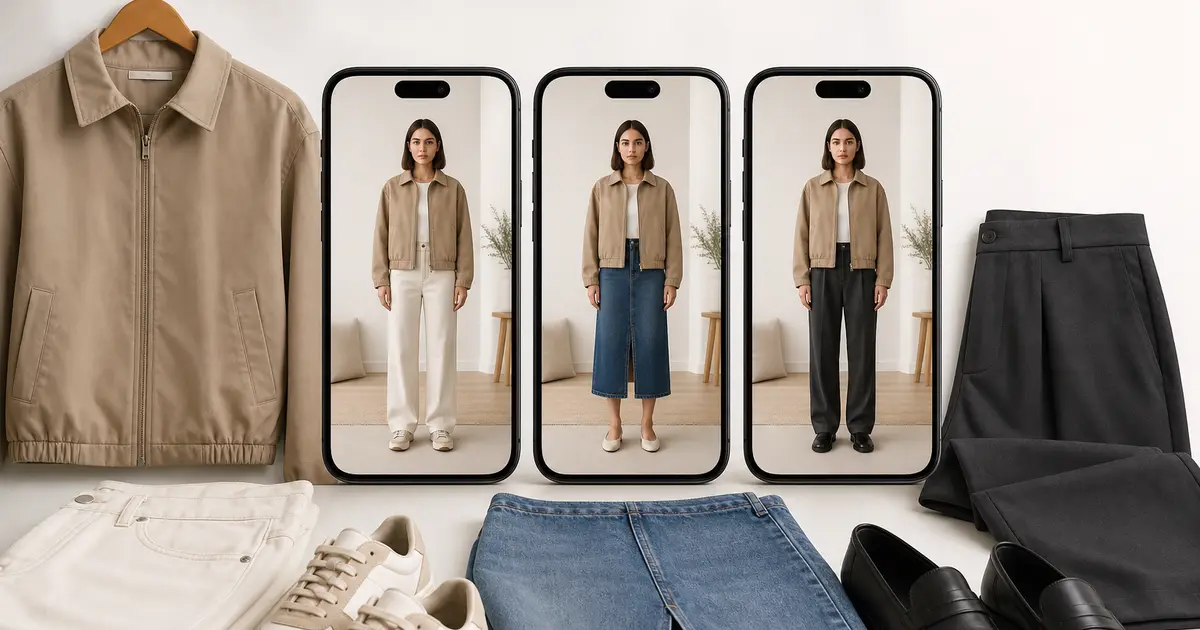
The best virtual try-on app for most people in 2026 is Wdrobe if you want to see any clothing item on your own photo alongside the clothes you already own. Google's try-on is the quickest choice if you only want to test products you find in Google Shopping. Alta suits people who want an avatar with daily outfit ideas, TryDrobe is the best if you want to work on the web, and Fits suits people who want try-on inside a closet app with a community.
What separates them is less the image quality, which is now good across the board, and more what you are allowed to try on: any photo of any garment, only partner retailer listings, or only items already in your closet. Features below were checked against each app's store listing or help pages in September 2026.
Wdrobe is our app, so put it through the same test as the others. Take the shop photo of something you nearly bought last month, try it on your own picture in Wdrobe and judge the preview for yourself.
Virtual try-on apps compared
Try on your own photo | Any clothing image | Clothes you own | Wardrobe and planner | Platforms | |
|---|---|---|---|---|---|
Wdrobe | Yes | Yes | Yes | Yes, with AI stylist | iPhone, Android |
Google try-on | Yes | No, eligible listings only | No | No | Google Search and Shopping |
Alta | Avatar from your photo | No | Yes | Yes, with AI stylist | iPhone, Android, web |
TryDrobe | Yes | Yes | Yes | Yes | Web, iPhone, Android |
Yes, after a selfie setup | Wishlist items | Yes | Yes | iPhone, Android | |
Indyx | Outfit selfies | No | Yes | Yes | iPhone, Android |
If you searched for Doppl: Google closed the Doppl app on 30 April 2026 and moved its try-on technology into Google Search and Shopping.
1. Wdrobe: best for trying on anything with your own wardrobe
Wdrobe lets you upload a photo of yourself and a photo of a clothing item, from a shop, a screenshot, or your own closet, and shows the outfit on you. The same app holds your digital wardrobe and outfit planner, so a new piece can be tried on with the trousers or coat you already own rather than on its own.
A few features go beyond a single try-on:
Colour analysis from your photo, to see which shades and cuts tend to suit you.
Pinterest and inspiration images turned into try-ons, so a saved look can be tested on you.
Weather-aware outfit suggestions from your wardrobe for the day.
It runs on iPhone and Android.
Best for: checking whether something you are about to buy works on you and with what you own.
Less good for: people who only want a closet list and never plan to try anything on.
2. Google try-on: quickest for Google Shopping products
Google's try-on works inside Search and Google Shopping. On eligible product listings, you upload a full-length photo and see the item on you. It covers tops, bottoms, dresses and shoes, and it is available in the US, UK and India, with more countries being added. In the US, Google can also build a full-body image from a selfie.
It needs no download, which makes it the easiest place to try a single product. The limit is scope. You can only try on products from retailers taking part, and nothing connects to the clothes you already own.
Best for: quick checks while shopping on Google.
Less good for: styling a new piece with your existing wardrobe, or trying on something from a shop Google does not list.
An avatar is not you. A generic body shows how a garment hangs in principle; your own photo shows whether it works. See the difference on your own photo.
3. Alta: best for daily outfits on an avatar
Alta is a styling app that builds a daily outfit from your closet, your weather and your calendar. Its try-on uses an avatar generated from your photo, so you see suggested outfits on a version of you. It works on iPhone, Android and the web, and was named one of TIME's Best Inventions of 2025.
Alta earns from shopping recommendations, so notice how often it points you to buy something new. Its avatar is also a generated version of you rather than your own photo.
Best for: daily outfit ideas on an avatar.
Less good for: trying on a specific item from any shop exactly as it looks.
4. TryDrobe: best if you want a web version
TryDrobe offers try-on on your own photo with clothing images from any brand, plus closet saving and outfit planning. Its big difference is a full web app as well as iPhone and Android, which suits people who shop on a laptop. It has less focus on styling suggestions than Wdrobe or Alta.
Best for: shopping on a computer and trying items as you browse.
Less good for: people who want an AI stylist to suggest outfits for them.
5. Fits: best closet app with try-on built in
Fits is a closet and outfit planner that added AI try-on. You set up a try-on profile with a selfie and body type, then try on clothes you own or items saved to a wishlist. It also has mood boards, style collages and a community feed. Its try-on depends on first adding items or wishlist pieces.
Best for: people who want organising, collages and try-on in one place.
Less good for: trying on a random item quickly without adding it first.
6. Indyx: best if you also want a human stylist
Indyx is mainly a wardrobe organiser. Its outfit selfies let you picture saved outfits on yourself, and the Insider plan makes them unlimited. The draw is access to human stylists alongside the app.
Best for: organised closets with the option of expert help.
Less good for: trying on clothes you do not own yet.
How to choose a try-on app in two minutes
Ask yourself one question: what do you want to try on?
A product you found on Google. Use Google's try-on. It is already there.
Anything from any shop, with your own clothes. Use Wdrobe, or TryDrobe if you prefer the web.
Outfits made from what you already own. Wdrobe or Alta for AI outfit ideas, Fits or Indyx if you also want a full closet organiser.
Then check two practical things before you upload photos: how realistic the result looks with a patterned item, and how long your photos are stored.
How to test any try-on app with three items
Use the same full-length photo in each app, taken in daylight against a plain wall, standing straight with arms slightly away from your body. Then try on:
a plain, solid-colour top;
something with a pattern or texture, such as a check shirt or a cable knit; and
a full two-piece outfit.
Compare the results on four points. Does the colour look like the product photo? Does the pattern stay intact instead of blurring? Do your body proportions stay the same between tries? And does layering a jacket over a top look believable?
An app that handles the patterned piece and the layered outfit well will handle almost anything you throw at it. Most apps look good on a plain white T-shirt.
Try-on answers colour, proportion, and combination well. It does not answer fabric or fit, and knowing the line makes it useful rather than disappointing. Use it for what it is good at.
What virtual try-on can and cannot tell you
Try-on is now reliable for the questions that matter most when choosing clothes: whether a colour suits your skin tone, whether a length works on your frame, and whether the silhouette looks like you. Those answers alone stop a lot of returns.
It cannot tell you exact fit, how a fabric drapes and moves, how thick or see-through a material is, or how it feels to wear. Screens also show colour differently. Use try-on to decide whether something suits you, and the size chart and return policy to decide whether it will fit.
Is it safe to upload your photo?
Read the privacy policy for three things before you upload a full-length photo: whether photos are stored after the try-on, whether they are used to train AI models, and how to delete them. Use a photo in fitted, everyday clothes rather than underwear or swimwear. No app on this list needs that, and a normal outfit gives better results for layering anyway.
Frequently asked questions
What is the best app to try on clothes virtually?
Wdrobe is the strongest all-round choice if you want to try on any clothing item on your own photo and with clothes you own. Google's try-on is quickest for products in Google Shopping, and Alta suits people who want an avatar.
Which try-on app works with my own wardrobe?
Wdrobe tries on any new item next to the clothes already in your wardrobe, on your own photo. Google's try-on shows products on their own, and Alta uses an avatar rather than your photo.
Can I try on clothes from any website?
With Wdrobe or TryDrobe, yes: save or screenshot the product photo and upload it. Google's try-on only works on listings from retailers taking part.
How accurate are try-on apps?
They are dependable for colour, length and overall silhouette, and unreliable for exact fit and fabric behaviour. Treat the image as a styling preview and check the size chart before buying.
What happened to Google Doppl?
Google shut the Doppl app on 30 April 2026. Its try-on technology now works directly in Google Search and Shopping listings.
If you are still deciding what kind of app you need, compare the best AI stylist apps, or read how to use virtual try-on before you buy to cut down on returns. If you were hoping a chatbot could do this instead, can ChatGPT do virtual try-on sets out what it does and does not manage.
The hardest try-on question is not "does this look nice on me?" but "does this work with what I already own?". Wdrobe puts the new piece on your own photo next to the clothes already in your wardrobe, so you can see the whole outfit before you check out. Judge colour and proportion on yourself and try on the item sitting in your basket right now.
← All articles
Take Wdrobe with you
Enjoyed the read? Get the full virtual try-on experience — download Wdrobe on the App Store or Google Play.
Related articles
Gold behaves like a warm neutral with a light source in it. Here is what it sits beside, and the outfits that use it well.
Read Article
Ten colors that work with coral clothes, and how to tell coral apart from salmon and rust when you are buying.
Read Article
Forty degrees is the coat threshold. Here is the order to dress in, five outfits, and the indoor problem most people forget.
Read Article